
Start with the center of the screen near your eye level in your normal viewing position, then test that position in the room. Your seat, posture, TV dimensions and furniture all affect the result. Choose a comfortable screen position before the installer works out the bracket location.
Start from your seat
Sit on the couch or chair you actually use, with the cushions and backrest arranged normally. If you usually recline, check that posture too. Have someone measure from the floor to your eye level while you look ahead comfortably.
Samsung recommends measuring from the viewer’s usual seat and accounting for furniture beneath the screen. Its general example is a starting point; use your own measurement rather than treating a common height as a requirement. Samsung TV placement guidance
Check the other seats people regularly use. A bedroom, bar stool or standing viewing area calls for a different check than a low living-room couch. SANUS likewise recommends considering whether you watch seated, standing or both. SANUS mounting-height guidance
Test a screen outline
Use the TV’s actual overall width and height from its specifications. The advertised diagonal size is not its vertical height. Cut a paper outline or mark the corners with removable tape suitable for the wall finish; test the tape in an inconspicuous spot first.
- Mark the proposed center of the outline and measure its height from the floor.
- Sit in each regular viewing position and look at the whole outline, including its top edge.
- Check whether you can look comfortably without holding your head tilted upward.
- Check daylight reflections and lamps from those same seats.
- Move the outline and compare before settling on a position.
Use the outline to discuss the placement. Keep the actual TV safely supported until the mounting arrangement is ready; do not balance it against the wall to try out heights.
Center height and bottom edge
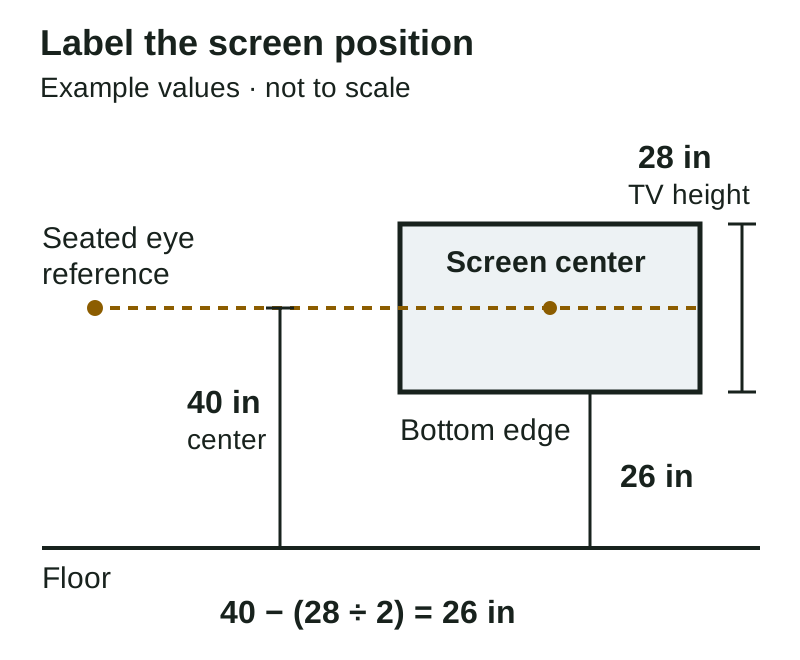
Write down which measurement you mean. “Forty inches high” is ambiguous unless you specify the screen’s center or bottom edge.
For a rectangular outline, bottom-edge height = chosen center height − half the TV’s overall height. For example, a 28-inch-tall TV centered 40 inches above the floor has its bottom edge 26 inches above the floor: 40 − 14 = 26. These are illustration values, not a recommended height for every room.
Check the room and equipment together
Add the console, soundbar and devices to the outline check. Confirm that the soundbar will not cover the picture or block a sensor. Look at ports, plug access, the cable route and how the TV would move with an adjustable mount. Our TV cable-management guide helps you prepare those questions.
Check the exact TV, soundbar and mount instructions for ventilation, movement and installation requirements. Keep vents clear. Samsung’s safety guidance requires adequate ventilation and following the installation instructions; a gap chosen for appearance alone does not establish compliance. Samsung mounting and ventilation precautions
A fireplace adds heat and equipment-limit questions as well as height. Samsung advises against mounting its TVs over a fireplace. If that is your proposed location, request a model-specific assessment before committing; a tilt adjustment does not establish that the location is suitable. Samsung fireplace guidance
Keep drilling locations separate
The screen center is not automatically the wall-plate center or a drilling point. The bracket geometry and mounting-hole position on the TV affect where the finished screen sits. SANUS’s HeightFinder uses the exact TV and SANUS mount model to calculate placement, which illustrates why the equipment matters. Follow the applicable mount template and manuals for the actual installation. SANUS equipment-specific placement guidance
Before buying hardware, use our TV mount selection guide to check the TV model, supported load, mounting pattern and wall construction. A comfortable viewing height still needs a suitable, verified attachment arrangement.
Save a short placement checklist
- TV: exact model, overall dimensions and manual.
- Seat: usual position, posture and measured eye height.
- Outline: preferred center and bottom-edge heights, clearly labeled.
- Room: a wide wall photo and a photo showing the viewing seats.
- Equipment: mount model or link, console and soundbar dimensions, device and cable preferences.
- Questions: uncertain wall construction, fireplace exposure, access or model-specific clearances.
Request a placement review
For a Raleigh or Triangle project, see our TV mounting service and request an estimate with your model details and preferred placement. Our estimate-photo guide explains useful views and privacy checks. The final scope and mounting arrangement need confirmation before installation.